> ## Documentation Index
> Fetch the complete documentation index at: https://claude.com/docs/llms.txt
> Use this file to discover all available pages before exploring further.
# Data storage and retention
> Where Claude for M365 stores chat history, skills, and credentials on each user's device, why reinstalling or switching add-ins keeps that data, and how long it is kept.
Claude for M365 stores chat history, uploaded skills, connector registrations,
and sign-in credentials on each user's own device, in the browser storage of
the webview that Office provides. Anthropic does not back up this data, and
nothing syncs between devices or browsers. Some of it still leaves the device
while the add-in is in use, as
[What leaves the device](#what-leaves-the-device) describes.
A device that is rebuilt, reimaged, or handed to someone else loses this data
unless you export it first.
## Every Claude for M365 add-in shares one store
Users run more than one Claude for M365 add-in over time: the per-app store
listings, an enterprise sideload, or a custom manifest that points the add-in at
your own cloud. All of them are served from `https://pivot.claude.ai`, and
browser storage is keyed to that address. They therefore read and write the same
store on a given device.
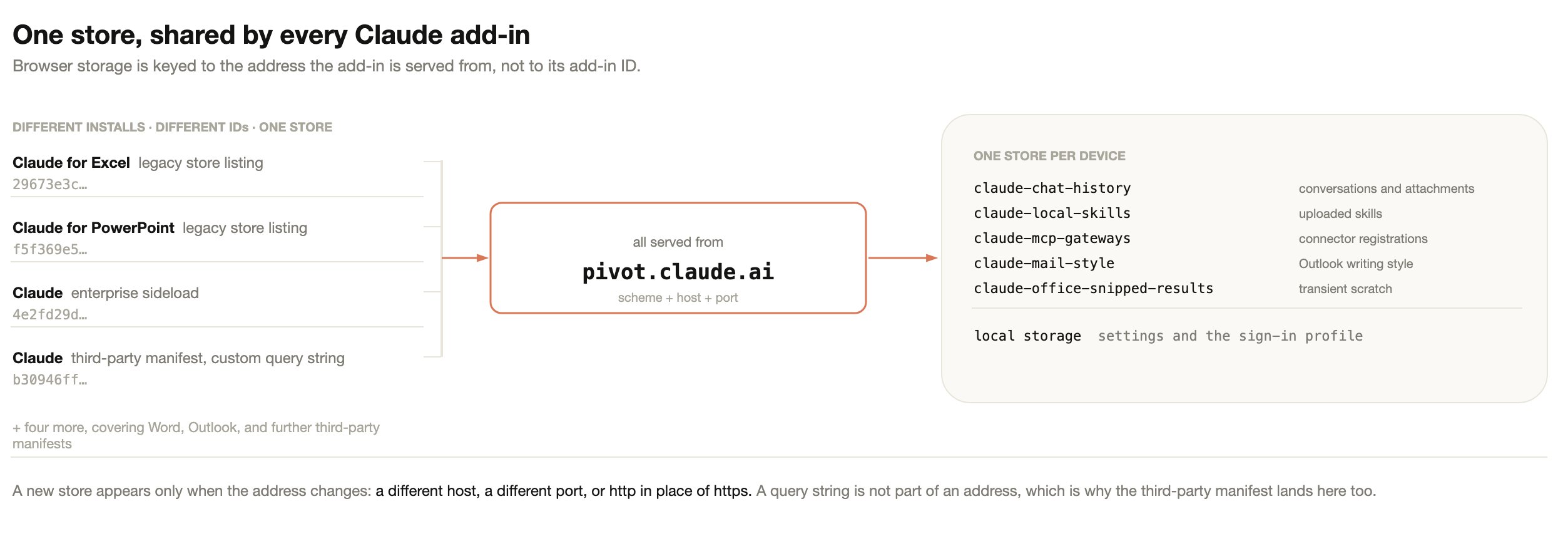 The reason is the ordinary web rule. Office reads the manifest, finds the
`` URL, and opens it in an embedded browser. From that point the
browser behaves as any browser does: it hands storage to the page's address,
meaning its scheme, host, and port. The add-in's ID, version, and display name
never enter the lookup, so a manifest is closer to a bookmark than to a
container. Deleting a bookmark does not delete the site's cookies.
Two consequences follow:
* A query string is not part of an address. A third-party manifest is built for
one organization and carries that organization's configuration in a query
string, so no two are alike. All of them still land in the same store as every
other install.
* Changing the address does create a new, empty store. Serving the add-in from a
different host, a different port, or over `http` instead of `https` gives it
somewhere else to read and write. The previous store still exists, but nothing
reads it.
The table below gives the result for each change users and administrators
actually make.
| Change | Result |
| - | - |
| Uninstall and reinstall the same add-in | Data intact |
| Move to a different store listing, or to one published with a new ID | Data intact. A new listing means a new add-in ID, not new storage |
| Move from a sideloaded manifest to a store listing, or the reverse | Data intact |
| Swap the standard manifest for the custom third-party manifest, or the reverse | Storage intact, but the history list changes, because the connection mode change is an identity change. See [what chat history is keyed to](#what-chat-history-is-keyed-to) |
| Run a store install and a sideloaded manifest at the same time | Shared storage. Two entries in Office, one history. Remove one to avoid confusion |
| Bump the manifest version, or issue a new ID to clear an Admin Center cache | Data intact |
| Serve the add-in from a different host or port, or over `http` | A new empty store |
| Rebuild, reimage, or wipe the profile on the device | Data destroyed. Export first |
## What Claude for M365 stores
The table below lists the add-in's IndexedDB databases and its local storage,
all inside the signed-in user's operating system profile, with what each one
holds and what it is scoped to.
| Store | Contents | Scoped to |
| - | - | - |
| `claude-chat-history` | Conversation transcripts with their titles and timestamps, and some files in full. A transcript includes the document, email, and calendar content that Claude read. The add-in keeps images, PDFs, `.pptx` files, and `.potx` files that a user attaches, and every file that a user attaches to the chat in Outlook or in a third-party platform deployment. It also keeps any other file that Claude downloads to the device to work with, the files of skills a conversation used, and files returned by connectors, as well as data that Claude saves while it works. These files and data can include document content and, in Outlook, email and calendar data from Microsoft Graph. Each saved conversation also keeps the name, type, and size of every attached file and, in Excel, Word, and PowerPoint, the document's file path or URL | One user, one organization, one Office app |
| `claude-local-skills` | Skills the user uploaded, including any templates bundled with them | The device profile, not the individual user |
| `claude-mcp-gateways` | Client registrations, and access and refresh tokens, for connectors the user has authorized | The connector's address, not the individual user |
| `claude-mail-style` | Claude for Outlook only: learned writing style, draft preferences, and scratchpad | One user |
| `claude-memory` | Only with a Claude account sign-in, and only when memory is on: notes that Claude saves so it can use them in later conversations, such as the user's role, their feedback on Claude's work, and details of their projects. A note can include content from a document Claude read. Each note holds its file name, its text, the user's ID, and the time it was last changed | One user |
| `claude-office-inflight` | Crash-detection records. There is one record for each add-in pane that is running a tool call. It holds a random ID for the pane, the conversation's ID, the tool's name, the Office app and its version, the start time, and, in Excel, Word, and PowerPoint, the document's file path or URL if it had one when the add-in opened. When the add-in opens and finds a record from a call that began more than 10 minutes earlier, which usually means Office or the add-in closed during the call, it sends a usage event for that record and deletes it. The event carries the pane's and the conversation's IDs, the Office app and its version, the time from the call's start until the record was found, and the tool's name, with a connector's tool reported only as a connector tool. It does not carry the document's path. [Data retention](#data-retention) gives when each record is deleted | The device profile, not the individual user |
| `claude-office-snipped-results` | Parts of the current conversation that were moved out of Claude's working context, which can include document content. A saved conversation keeps its own copy in `claude-chat-history`. [Data retention](#data-retention) gives when this store is emptied | The device profile, not the individual user |
| Local storage | Settings, onboarding and terms flags, and the active sign-in profile | The browser profile |
Conversations, memory notes, and the Outlook writing style guide are scoped to
the individual user. Uploaded skills, connector registrations, crash-detection
records, and conversation parts moved out of Claude's working context are
scoped to the storage location instead, so anyone who reaches the same store
shares them. The Windows and macOS sections below describe what splits a store
on each platform.
This only applies where people share a single operating system account. That
arrangement already shares the browser profile, saved sessions, and local files
between them, so the guidance is the same as for any browser-based tool: give
each person their own operating system account.
Claude for M365 also writes one value into the Office document itself: an opaque
identifier that lets the add-in recognize the same file after a rename or a Save
As. It holds no user information and no conversation content, and it travels
with the file if the document is shared.
## Sign-in and credentials
Every store above holds only content, with two exceptions. Local storage holds
the signed-in user's identity: the credential the add-in presents to the model
endpoint you configured. `claude-mcp-gateways` holds an access token, and a
refresh token when the connector issues one, for each connector that your
deployment configures and the user has authorized.
Local storage also holds the Microsoft Entra ID tokens that Microsoft's sign-in
library keeps for the add-in, such as the token that Claude for Outlook uses to
call Microsoft Graph.
What the credential is depends on how users sign in:
* A Claude account sign-in stores an access token, and a refresh token that the
add-in uses to get a new access token.
* A Vertex AI sign-in stores a Google refresh token with the `cloud-platform`
scope, and the OAuth client ID and client secret that you configured.
* An Amazon Bedrock sign-in stores the user's Entra ID token and sign-in name,
and short-lived AWS credentials. A Foundry sign-in through Microsoft Entra ID
stores a short-lived Entra ID access token for the resource that your
manifest's Entra scope names. The add-in renews both automatically.
* A gateway token or API key that you configure yourself is held until you
change it. A gateway token from a bootstrap endpoint is fetched again each
time the add-in loads, shortly before any expiry that the endpoint declares,
and after the gateway rejects a request as unauthorized.
Where Office provides storage for the add-in, the add-in also writes a second
copy of the sign-in there, and reads it back when the browser copy is missing.
Signing out deletes both copies of the sign-in, and the connector tokens, from
the storage that the add-in is using. Other Claude task panes that share that
storage sign out too. On macOS each Office app has its own storage, and on
Windows two Office apps can have separate storage. An Office app with its own
storage keeps its sign-in and connector tokens until the user signs out there
too. Signing out does not delete the tokens that Microsoft's sign-in library
keeps.
Signing out also asks Anthropic to revoke the Claude account sign-in that the
task pane holds, and a sign-in that
[serves add-in settings from your Claude organization](/docs/office-agents/third-party-platforms#serve-add-in-settings-from-your-claude-organization),
so that they cannot be used to get new access tokens. The add-in sends this
request once and does not try again if it fails. A separate Claude sign-in in
an Office app with its own storage is not revoked. Signing out does not revoke
any other credential with the service that issued it. That includes the
connector tokens, the tokens that Microsoft's sign-in library keeps, Vertex AI,
Amazon Bedrock, and Foundry sign-ins, and a gateway token or API key.
The add-in does not encrypt these credentials. The boundary protecting the
browser copy is the operating system account: a standard account on the same
machine cannot read it, an administrator account can, and disk encryption,
where the device uses it, covers the device at rest. Where the deployment signs
in to a cloud provider, the credential is obtained on the device and used from
the device. A gateway token
or API key that you issue centrally is distributed to every user's device, so
treat it as you would any other shared secret.
An export of a user's add-in data contains these credentials as well as
conversation text, because the export copies local storage. Treat an export
folder as a secret. It also holds the connector tokens from
`claude-mcp-gateways`, so deleting only its local storage folder does not
remove every credential. A rebuilt machine signs in again regardless.
## Where the data sits on Windows
On Windows the store is split by signed-in Office account. Local storage is one
database for the whole browser profile rather than one per address, which is the
main difference from macOS.
The reason is the ordinary web rule. Office reads the manifest, finds the
`` URL, and opens it in an embedded browser. From that point the
browser behaves as any browser does: it hands storage to the page's address,
meaning its scheme, host, and port. The add-in's ID, version, and display name
never enter the lookup, so a manifest is closer to a bookmark than to a
container. Deleting a bookmark does not delete the site's cookies.
Two consequences follow:
* A query string is not part of an address. A third-party manifest is built for
one organization and carries that organization's configuration in a query
string, so no two are alike. All of them still land in the same store as every
other install.
* Changing the address does create a new, empty store. Serving the add-in from a
different host, a different port, or over `http` instead of `https` gives it
somewhere else to read and write. The previous store still exists, but nothing
reads it.
The table below gives the result for each change users and administrators
actually make.
| Change | Result |
| - | - |
| Uninstall and reinstall the same add-in | Data intact |
| Move to a different store listing, or to one published with a new ID | Data intact. A new listing means a new add-in ID, not new storage |
| Move from a sideloaded manifest to a store listing, or the reverse | Data intact |
| Swap the standard manifest for the custom third-party manifest, or the reverse | Storage intact, but the history list changes, because the connection mode change is an identity change. See [what chat history is keyed to](#what-chat-history-is-keyed-to) |
| Run a store install and a sideloaded manifest at the same time | Shared storage. Two entries in Office, one history. Remove one to avoid confusion |
| Bump the manifest version, or issue a new ID to clear an Admin Center cache | Data intact |
| Serve the add-in from a different host or port, or over `http` | A new empty store |
| Rebuild, reimage, or wipe the profile on the device | Data destroyed. Export first |
## What Claude for M365 stores
The table below lists the add-in's IndexedDB databases and its local storage,
all inside the signed-in user's operating system profile, with what each one
holds and what it is scoped to.
| Store | Contents | Scoped to |
| - | - | - |
| `claude-chat-history` | Conversation transcripts with their titles and timestamps, and some files in full. A transcript includes the document, email, and calendar content that Claude read. The add-in keeps images, PDFs, `.pptx` files, and `.potx` files that a user attaches, and every file that a user attaches to the chat in Outlook or in a third-party platform deployment. It also keeps any other file that Claude downloads to the device to work with, the files of skills a conversation used, and files returned by connectors, as well as data that Claude saves while it works. These files and data can include document content and, in Outlook, email and calendar data from Microsoft Graph. Each saved conversation also keeps the name, type, and size of every attached file and, in Excel, Word, and PowerPoint, the document's file path or URL | One user, one organization, one Office app |
| `claude-local-skills` | Skills the user uploaded, including any templates bundled with them | The device profile, not the individual user |
| `claude-mcp-gateways` | Client registrations, and access and refresh tokens, for connectors the user has authorized | The connector's address, not the individual user |
| `claude-mail-style` | Claude for Outlook only: learned writing style, draft preferences, and scratchpad | One user |
| `claude-memory` | Only with a Claude account sign-in, and only when memory is on: notes that Claude saves so it can use them in later conversations, such as the user's role, their feedback on Claude's work, and details of their projects. A note can include content from a document Claude read. Each note holds its file name, its text, the user's ID, and the time it was last changed | One user |
| `claude-office-inflight` | Crash-detection records. There is one record for each add-in pane that is running a tool call. It holds a random ID for the pane, the conversation's ID, the tool's name, the Office app and its version, the start time, and, in Excel, Word, and PowerPoint, the document's file path or URL if it had one when the add-in opened. When the add-in opens and finds a record from a call that began more than 10 minutes earlier, which usually means Office or the add-in closed during the call, it sends a usage event for that record and deletes it. The event carries the pane's and the conversation's IDs, the Office app and its version, the time from the call's start until the record was found, and the tool's name, with a connector's tool reported only as a connector tool. It does not carry the document's path. [Data retention](#data-retention) gives when each record is deleted | The device profile, not the individual user |
| `claude-office-snipped-results` | Parts of the current conversation that were moved out of Claude's working context, which can include document content. A saved conversation keeps its own copy in `claude-chat-history`. [Data retention](#data-retention) gives when this store is emptied | The device profile, not the individual user |
| Local storage | Settings, onboarding and terms flags, and the active sign-in profile | The browser profile |
Conversations, memory notes, and the Outlook writing style guide are scoped to
the individual user. Uploaded skills, connector registrations, crash-detection
records, and conversation parts moved out of Claude's working context are
scoped to the storage location instead, so anyone who reaches the same store
shares them. The Windows and macOS sections below describe what splits a store
on each platform.
This only applies where people share a single operating system account. That
arrangement already shares the browser profile, saved sessions, and local files
between them, so the guidance is the same as for any browser-based tool: give
each person their own operating system account.
Claude for M365 also writes one value into the Office document itself: an opaque
identifier that lets the add-in recognize the same file after a rename or a Save
As. It holds no user information and no conversation content, and it travels
with the file if the document is shared.
## Sign-in and credentials
Every store above holds only content, with two exceptions. Local storage holds
the signed-in user's identity: the credential the add-in presents to the model
endpoint you configured. `claude-mcp-gateways` holds an access token, and a
refresh token when the connector issues one, for each connector that your
deployment configures and the user has authorized.
Local storage also holds the Microsoft Entra ID tokens that Microsoft's sign-in
library keeps for the add-in, such as the token that Claude for Outlook uses to
call Microsoft Graph.
What the credential is depends on how users sign in:
* A Claude account sign-in stores an access token, and a refresh token that the
add-in uses to get a new access token.
* A Vertex AI sign-in stores a Google refresh token with the `cloud-platform`
scope, and the OAuth client ID and client secret that you configured.
* An Amazon Bedrock sign-in stores the user's Entra ID token and sign-in name,
and short-lived AWS credentials. A Foundry sign-in through Microsoft Entra ID
stores a short-lived Entra ID access token for the resource that your
manifest's Entra scope names. The add-in renews both automatically.
* A gateway token or API key that you configure yourself is held until you
change it. A gateway token from a bootstrap endpoint is fetched again each
time the add-in loads, shortly before any expiry that the endpoint declares,
and after the gateway rejects a request as unauthorized.
Where Office provides storage for the add-in, the add-in also writes a second
copy of the sign-in there, and reads it back when the browser copy is missing.
Signing out deletes both copies of the sign-in, and the connector tokens, from
the storage that the add-in is using. Other Claude task panes that share that
storage sign out too. On macOS each Office app has its own storage, and on
Windows two Office apps can have separate storage. An Office app with its own
storage keeps its sign-in and connector tokens until the user signs out there
too. Signing out does not delete the tokens that Microsoft's sign-in library
keeps.
Signing out also asks Anthropic to revoke the Claude account sign-in that the
task pane holds, and a sign-in that
[serves add-in settings from your Claude organization](/docs/office-agents/third-party-platforms#serve-add-in-settings-from-your-claude-organization),
so that they cannot be used to get new access tokens. The add-in sends this
request once and does not try again if it fails. A separate Claude sign-in in
an Office app with its own storage is not revoked. Signing out does not revoke
any other credential with the service that issued it. That includes the
connector tokens, the tokens that Microsoft's sign-in library keeps, Vertex AI,
Amazon Bedrock, and Foundry sign-ins, and a gateway token or API key.
The add-in does not encrypt these credentials. The boundary protecting the
browser copy is the operating system account: a standard account on the same
machine cannot read it, an administrator account can, and disk encryption,
where the device uses it, covers the device at rest. Where the deployment signs
in to a cloud provider, the credential is obtained on the device and used from
the device. A gateway token
or API key that you issue centrally is distributed to every user's device, so
treat it as you would any other shared secret.
An export of a user's add-in data contains these credentials as well as
conversation text, because the export copies local storage. Treat an export
folder as a secret. It also holds the connector tokens from
`claude-mcp-gateways`, so deleting only its local storage folder does not
remove every credential. A rebuilt machine signs in again regardless.
## Where the data sits on Windows
On Windows the store is split by signed-in Office account. Local storage is one
database for the whole browser profile rather than one per address, which is the
main difference from macOS.
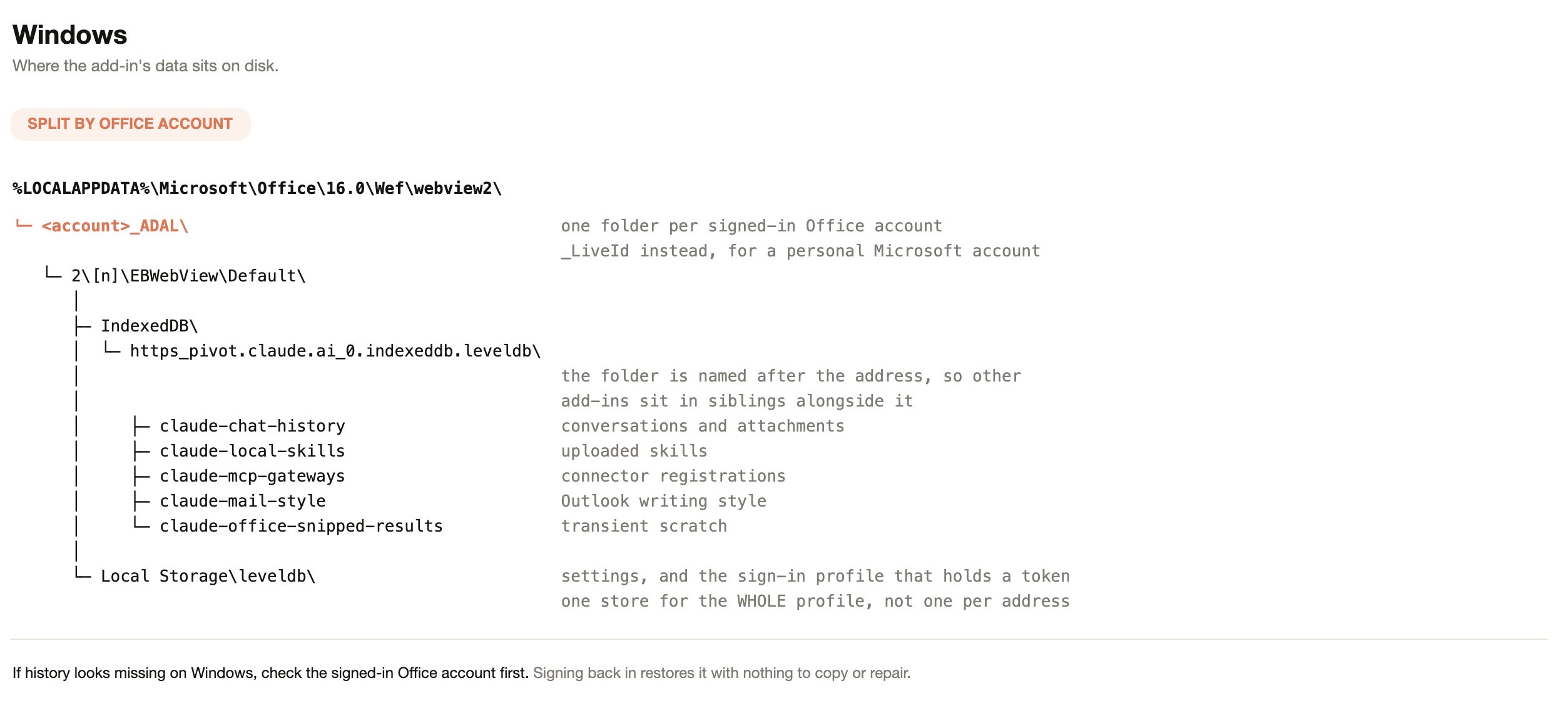 If chat history looks missing on Windows, check the signed-in Office account
before anything else. Signing back in to the original account restores the
history with nothing to copy or repair.
## Where the data sits on macOS
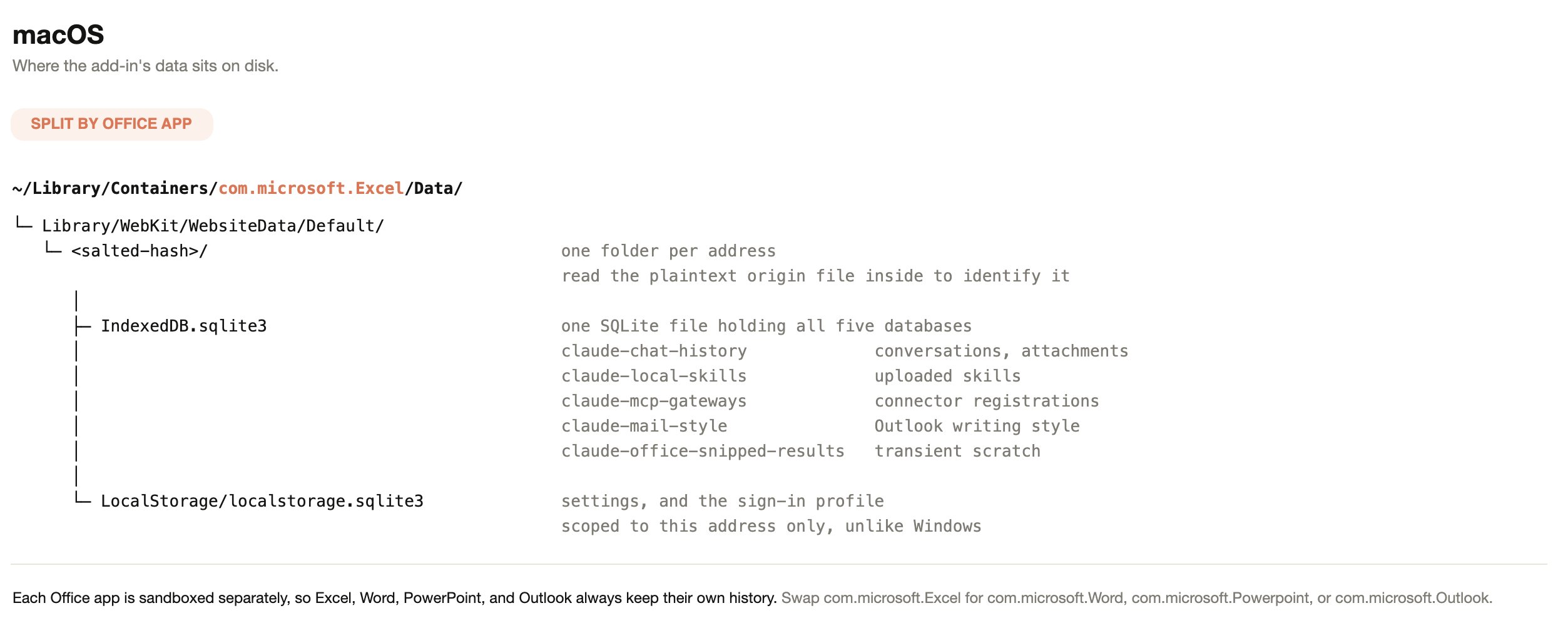
On macOS the store is split by Office app instead. Each app runs in its own
sandbox container, so Excel, Word, PowerPoint, and Outlook always keep separate
histories, and local storage sits inside the folder for a single address.
If chat history looks missing on Windows, check the signed-in Office account
before anything else. Signing back in to the original account restores the
history with nothing to copy or repair.
## Where the data sits on macOS
On macOS the store is split by Office app instead. Each app runs in its own
sandbox container, so Excel, Word, PowerPoint, and Outlook always keep separate
histories, and local storage sits inside the folder for a single address.
 Office on the web behaves differently again. The add-in runs in a cross-origin
frame, so browsers treat its storage as third-party. Tracking prevention,
policies that block third-party cookies, and similar controls partition or evict
it. Browsers evict third-party storage on their own schedule, so treat chat
history on Office on the web as temporary.
## What chat history is keyed to
Sharing a store is not the same as sharing a history list. Each conversation is
stored against a user identity, an organization, and the Office app it was
created in. The list shows only the conversations that match all three for the
session in use.
When users sign in with a Claude account, that account is the identity. In
third-party platform deployments there is no Claude account, so the identity
comes from the Microsoft Entra ID sign-in already present in Office, as a
one-way hash of the directory object ID. The history key holds nothing about
the user in readable form. The hash is the same for that user on every device, and
usage events include it, as described in
[What leaves the device](#what-leaves-the-device).
Office builds without support for nested app authentication cannot supply the
Entra ID sign-in the add-in reads. On those builds Claude for M365 falls back to
a per-installation identifier. Conversations still persist on that device; they
are tied to the installation rather than to the directory account.
The table below gives the result for each case.
| Situation | Result |
| - | - |
| A user signs out of Claude and signs back in | The same conversations. Signing out does not change the identity |
| A different person signs in to Office on that device | They see their own conversations, not the previous user's. On Office builds that fall back to a per-installation identifier, both people resolve to the same identity and share one list |
| The same person opens the add-in on a second device | No conversations. Storage is per device and does not sync |
| A user's organization changes, such as joining or leaving a team plan | Earlier conversations stop appearing. They remain on disk under the previous organization |
| A deployment moves between a Claude account sign-in and a third-party platform, in either direction | Earlier conversations stop appearing. They remain on disk under the previous identity, and the add-in has no path to reach them |
Changing connection mode is not a data loss event, because nothing is deleted,
but it is an identity change and the history list follows the identity.
One store derives identity differently from chat history. The Outlook writing
style guide has no per-installation fallback. On Office builds where the Entra
ID identity cannot be read, it falls back to a single shared key, so one learned
writing style is shared by everyone using that browser profile.
## Data retention
The table below shows how long Claude for M365 keeps each kind of local data.
Users can also delete their saved conversations at any time, as described after
the table.
| Store | Retention |
| - | - |
| `claude-chat-history` | The 50 most recent conversations per user, per organization, per Office app. Older conversations are deleted automatically |
| Any store | When the browser profile runs out of storage quota, the oldest conversations are deleted to make room |
| `claude-memory` | A note is kept until it is deleted or the browser profile is wiped. Claude can delete a note, for example when the user asks it to forget something. When Claude saves a note, the chat shows a notice with an Undo button, which removes the note or restores its earlier text. There is no setting to view or delete notes, and deleting saved conversations does not delete notes |
| `claude-office-inflight` | Each record is deleted when its tool call ends, or when the user stops Claude, starts a new chat, or opens a saved conversation. It is also deleted while Claude waits for the user to answer a question or approve an action, and written again afterwards. If Office or the add-in closes or reloads during the call, the record is deleted the next time a Claude for M365 add-in that uses the same store opens, once more than 10 minutes have passed since the call began |
| `claude-office-snipped-results` | Emptied when the user starts a new chat or deletes all chats. Replaced with a saved conversation's parts when a saved conversation is opened. Content left when the add-in closes stays until Claude next moves content out of its working context or asks for moved content back, a saved conversation is opened, or a new chat starts |
| Everything else | Kept until the user deletes it or the browser profile is wiped |
Users clear their own conversations from the add-in's settings. Under "Chat
history", "Delete all" removes every saved conversation for that user in that
Office app and starts a new chat.
There is no expiry by age and no administrator-configurable retention window.
Claude for M365 also does not inherit custom data retention settings configured
for your organization. If your policy requires a retention limit on this data,
the practical control is the device profile lifecycle, such as roaming-profile
cleanup or reimaging, rather than a setting in the add-in.
## What leaves the device
The table below covers each category and its destination, so you can scope a
review to the paths that carry content off the endpoint.
| Data | Where it goes |
| - | - |
| Conversation text, attachments, and the document content Claude is asked to work with | The model endpoint your deployment is configured for. In third-party platform deployments that is your own Vertex AI, Bedrock, Azure, or gateway endpoint |
| Files that a user attaches, with a Claude account sign-in | Uploaded to Anthropic with the user's Claude sign-in when the user attaches them, before the message is sent. Each file expires 28 days after the add-in uploads it. If Anthropic does not accept an expiry for the user's organization, the add-in uploads the file with no expiry. The add-in does not delete files itself. Earlier versions of the add-in set no expiry on the files they uploaded. The add-in started setting an expiry on September 15, 2026 |
| Chat history, uploaded skills, and connector registrations | Not synced between devices and not backed up on any server. The add-in still sends their contents to the model endpoint when Claude uses them, as the rows above describe. Every chat request includes the name and description of each skill that is turned on. With a Claude account sign-in, it also includes the name and description of each plugin the user has turned on, with the names of its skills and connectors, and the organization's Claude settings can turn skills off, which stops both. When Claude uses a skill, the add-in also sends the skill's instructions and Markdown files. With a Claude account sign-in, files attached in a chat are also uploaded to Anthropic |
| Claude for Outlook writing style guide, draft preferences, and scratchpad | Not synced between devices and not backed up on any server. To build the style guide and the draft preferences, the add-in sends recent sent mail, with the first recipient's address of each message, and the user's edits to drafts to the model endpoint. After that, every Outlook chat request includes the style guide and the draft preferences, and every message the user sends in Outlook includes the scratchpad |
| Sign-in credentials | To the services the sign-in is for, with two exceptions described last. A Bedrock sign-in sends the Entra ID token to AWS, which exchanges it for short-lived credentials. A Claude account token also goes to `claude.ai` with feature-flag requests. The exceptions: a credential that you put in the query string of the manifest URL also reaches Anthropic's server at `pivot.claude.ai` each time the add-in loads, and the server's request logs record it. A Vertex AI sign-in also returns Google's one-time authorization code to `pivot.claude.ai` in the query string, where request logs can record it. The code cannot be exchanged for a token without your OAuth client secret, so keep the client secret out of the manifest URL query string too. See [Keep credentials out of the manifest URL query string](/docs/office-agents/third-party-platforms#keep-credentials-out-of-the-manifest-url-query-string) |
| Identifiers on model requests | Each request for a model response carries the name of the add-in, a random identifier for the device, and a session ID. For a chat message, the session ID is the conversation's ID. The add-in also sends helper requests to the same endpoint. In every Office app, they summarize a long conversation, write the status line shown while Claude thinks, and, when memory is on, check an entry before Claude saves it. In Word and PowerPoint, they check how the document or a slide looks after Claude edits it, and in Word they also check Claude's reasoning before it edits legal language. In Outlook, they rewrite a passage the user selects in a draft, and learn the user's writing style from recent sent mail and from the user's edits to drafts. Each helper request carries a session ID made from the kind of helper request, the device identifier, and the date in UTC, so helper requests of one kind from one device on one day share a session ID. With a Claude account sign-in, requests also carry the user's account ID. In third-party platform deployments, requests carry no account ID and no email address. That includes deployments whose settings Anthropic serves, where members sign in with a Claude account. The short test requests that the add-in sends to check which models and features your endpoint supports, such as web search and code execution, carry none of these values |
| Feature-flag requests | In every deployment, the add-in asks `claude.ai` which features to show. Each request includes the device identifier, the Office app, and, when the user is signed in to Office, the Entra ID tenant ID. With a Claude account sign-in, it also includes the user's email address, account ID, and organization ID. In every deployment, the add-in sends a usage event for each feature variant it showed. With a Claude account sign-in, the add-in also sends each variant it showed directly to Anthropic, with the organization ID |
| Usage events | Sent to Anthropic's server at `pivot.claude.ai`, which forwards them to Anthropic's event logging service. Each event has a name and properties such as counts, durations, the model, and the Office app and its version, with the device identifier and an ID for the task pane session. With a Claude account sign-in, events also carry the account and organization IDs. Before sending an event, the add-in removes the fields known to carry file names, file paths, error text, and the names of your connectors and their tools. The filter matches field names, so it does not remove such text from a field it does not name. Events that load an Excel workbook or a PowerPoint presentation carry an unsalted hash of the file's path or address. With a Claude account sign-in, a user can rate a response and add a comment. The comment reaches Anthropic's server, which forwards the comment's length but not its text. When a user types a job role that is not on the list, the server forwards that the user chose Other, but not the text |
| Identifiers from Office on usage events | When the user is signed in to Office, usage events also carry the Entra ID tenant ID, the domain of the user's email address, and the hash described in [What chat history is keyed to](#what-chat-history-is-keyed-to). The hash is unsalted, so anyone who knows the user's Entra ID object ID can match it |
| Error reports sent to Sentry, with a Claude account sign-in | The user's account ID, the text of the error, the name of the tool that failed, and details about what failed, such as the name of a skill, a skill file, a memory entry, or a connector's host. The error text and these details can include conversation and document content. A report also lists the hosts the add-in contacted before the error |
| Error reports sent to Sentry, in third-party platform deployments | Once the add-in has loaded the user's sign-in, each report holds only the type of error, where in the code it happened, the add-in's version, the Office app with its platform and version, the sign-in type, and the name of the built-in tool that failed. Reports sent before that point, such as those from the sign-in page, also include the error text and the hosts the add-in contacted |
| Diagnostic traces, logs, and metrics sent to Anthropic | Counts, durations, error types, the model, request IDs, the names of built-in tools, and a session ID. With a Claude account sign-in, traces also carry the organization ID. Before sending traces and logs, the add-in removes every field that is not on an allowlist, so they exclude conversation text, document contents, file names, and the names of your connectors and their tools. Before sending metrics, the add-in removes a list of fields that includes file names and connector names |
| Telemetry sent to a custom OpenTelemetry collector you configure | A collector set in the claude.ai admin console, in the manifest, in Entra ID claims, or by your bootstrap endpoint receives the full audit trail, including prompt content and tool inputs and outputs. That path skips the allowlist filter by design. A collector named in add-in settings that Anthropic serves from your Claude organization receives only the kinds of content those settings select, and no conversation or tool content if they select none. While a custom collector is set, traces and logs go only to that collector, and metrics still go to Anthropic. See [Audit and observability](/docs/office-agents/enterprise-readiness#audit-and-observability) |
When Anthropic
[serves your add-in settings from your Claude organization](/docs/office-agents/third-party-platforms#serve-add-in-settings-from-your-claude-organization),
members sign in with a Claude account. This option is in preview. Feature-flag
requests, usage events, and the session records that Sentry keeps, which count
sessions and crashes, then carry the identifiers described for a Claude account
sign-in. Error reports follow the row for third-party platform deployments.
Files that these members attach are not uploaded to Anthropic. Your
organization's setting that turns off third-party analytics does not apply to
these members.
Until September 23, 2026, Anthropic's server sent usage events to Segment, a
third-party analytics service. These included the text of rating comments and
any job role a user typed during onboarding or in a later survey.
With a Claude account sign-in, the add-in stops sending usage events and error
reports for an organization whose Claude settings turn off third-party
analytics. Usage events go to Anthropic rather than to a third party, and the
setting still stops them. The add-in applies the setting once it has loaded the
organization's settings, so events from before that point, such as those during
sign-in, can still be sent.
The setting does not stop the following:
* The session records that Sentry keeps. They can include the user's account
ID.
* Feature-flag requests, and the feature variants the add-in sends directly to
Anthropic.
* The identifiers on model requests.
* The traces, logs, and metrics sent to Anthropic.
In third-party platform deployments, including those whose settings Anthropic
serves, no add-in setting stops usage events or error reports. You can block
the Sentry host listed in the
[network allowlist](/docs/office-agents/third-party-platforms#network-allowlist).
## Export a user's data before a device is rebuilt
The `claude-for-msft-365-install` plugin includes read-only export scripts for
macOS and Windows. They read Office's storage and write only to the folder you
name, and running them with no arguments reports what was found without copying
anything. See
[Deploy the add-in for your organization](/docs/office-agents/third-party-platforms#deploy-the-add-in-for-your-organization)
for installation, then run `/claude-for-msft-365-install:export-data`.
Export before any of the following:
* A device is rebuilt, reimaged, or handed to another person.
* Anyone clears the Office add-in cache on Windows. The storage sits inside the
same `Wef` folder as the manifest cache, so deleting that folder destroys chat
history along with the manifest.
* Roaming-profile or FSLogix cleanup runs against the user's profile.
* A browser policy such as `ClearBrowsingDataOnExit` is applied to the device.
## Related
The pages below cover the deployment and security topics that reference this
data.
* [Security, admin auditability, and analytics](/docs/office-agents/enterprise-readiness)
* [Use Claude for M365 with third-party platforms](/docs/office-agents/third-party-platforms)
Office on the web behaves differently again. The add-in runs in a cross-origin
frame, so browsers treat its storage as third-party. Tracking prevention,
policies that block third-party cookies, and similar controls partition or evict
it. Browsers evict third-party storage on their own schedule, so treat chat
history on Office on the web as temporary.
## What chat history is keyed to
Sharing a store is not the same as sharing a history list. Each conversation is
stored against a user identity, an organization, and the Office app it was
created in. The list shows only the conversations that match all three for the
session in use.
When users sign in with a Claude account, that account is the identity. In
third-party platform deployments there is no Claude account, so the identity
comes from the Microsoft Entra ID sign-in already present in Office, as a
one-way hash of the directory object ID. The history key holds nothing about
the user in readable form. The hash is the same for that user on every device, and
usage events include it, as described in
[What leaves the device](#what-leaves-the-device).
Office builds without support for nested app authentication cannot supply the
Entra ID sign-in the add-in reads. On those builds Claude for M365 falls back to
a per-installation identifier. Conversations still persist on that device; they
are tied to the installation rather than to the directory account.
The table below gives the result for each case.
| Situation | Result |
| - | - |
| A user signs out of Claude and signs back in | The same conversations. Signing out does not change the identity |
| A different person signs in to Office on that device | They see their own conversations, not the previous user's. On Office builds that fall back to a per-installation identifier, both people resolve to the same identity and share one list |
| The same person opens the add-in on a second device | No conversations. Storage is per device and does not sync |
| A user's organization changes, such as joining or leaving a team plan | Earlier conversations stop appearing. They remain on disk under the previous organization |
| A deployment moves between a Claude account sign-in and a third-party platform, in either direction | Earlier conversations stop appearing. They remain on disk under the previous identity, and the add-in has no path to reach them |
Changing connection mode is not a data loss event, because nothing is deleted,
but it is an identity change and the history list follows the identity.
One store derives identity differently from chat history. The Outlook writing
style guide has no per-installation fallback. On Office builds where the Entra
ID identity cannot be read, it falls back to a single shared key, so one learned
writing style is shared by everyone using that browser profile.
## Data retention
The table below shows how long Claude for M365 keeps each kind of local data.
Users can also delete their saved conversations at any time, as described after
the table.
| Store | Retention |
| - | - |
| `claude-chat-history` | The 50 most recent conversations per user, per organization, per Office app. Older conversations are deleted automatically |
| Any store | When the browser profile runs out of storage quota, the oldest conversations are deleted to make room |
| `claude-memory` | A note is kept until it is deleted or the browser profile is wiped. Claude can delete a note, for example when the user asks it to forget something. When Claude saves a note, the chat shows a notice with an Undo button, which removes the note or restores its earlier text. There is no setting to view or delete notes, and deleting saved conversations does not delete notes |
| `claude-office-inflight` | Each record is deleted when its tool call ends, or when the user stops Claude, starts a new chat, or opens a saved conversation. It is also deleted while Claude waits for the user to answer a question or approve an action, and written again afterwards. If Office or the add-in closes or reloads during the call, the record is deleted the next time a Claude for M365 add-in that uses the same store opens, once more than 10 minutes have passed since the call began |
| `claude-office-snipped-results` | Emptied when the user starts a new chat or deletes all chats. Replaced with a saved conversation's parts when a saved conversation is opened. Content left when the add-in closes stays until Claude next moves content out of its working context or asks for moved content back, a saved conversation is opened, or a new chat starts |
| Everything else | Kept until the user deletes it or the browser profile is wiped |
Users clear their own conversations from the add-in's settings. Under "Chat
history", "Delete all" removes every saved conversation for that user in that
Office app and starts a new chat.
There is no expiry by age and no administrator-configurable retention window.
Claude for M365 also does not inherit custom data retention settings configured
for your organization. If your policy requires a retention limit on this data,
the practical control is the device profile lifecycle, such as roaming-profile
cleanup or reimaging, rather than a setting in the add-in.
## What leaves the device
The table below covers each category and its destination, so you can scope a
review to the paths that carry content off the endpoint.
| Data | Where it goes |
| - | - |
| Conversation text, attachments, and the document content Claude is asked to work with | The model endpoint your deployment is configured for. In third-party platform deployments that is your own Vertex AI, Bedrock, Azure, or gateway endpoint |
| Files that a user attaches, with a Claude account sign-in | Uploaded to Anthropic with the user's Claude sign-in when the user attaches them, before the message is sent. Each file expires 28 days after the add-in uploads it. If Anthropic does not accept an expiry for the user's organization, the add-in uploads the file with no expiry. The add-in does not delete files itself. Earlier versions of the add-in set no expiry on the files they uploaded. The add-in started setting an expiry on September 15, 2026 |
| Chat history, uploaded skills, and connector registrations | Not synced between devices and not backed up on any server. The add-in still sends their contents to the model endpoint when Claude uses them, as the rows above describe. Every chat request includes the name and description of each skill that is turned on. With a Claude account sign-in, it also includes the name and description of each plugin the user has turned on, with the names of its skills and connectors, and the organization's Claude settings can turn skills off, which stops both. When Claude uses a skill, the add-in also sends the skill's instructions and Markdown files. With a Claude account sign-in, files attached in a chat are also uploaded to Anthropic |
| Claude for Outlook writing style guide, draft preferences, and scratchpad | Not synced between devices and not backed up on any server. To build the style guide and the draft preferences, the add-in sends recent sent mail, with the first recipient's address of each message, and the user's edits to drafts to the model endpoint. After that, every Outlook chat request includes the style guide and the draft preferences, and every message the user sends in Outlook includes the scratchpad |
| Sign-in credentials | To the services the sign-in is for, with two exceptions described last. A Bedrock sign-in sends the Entra ID token to AWS, which exchanges it for short-lived credentials. A Claude account token also goes to `claude.ai` with feature-flag requests. The exceptions: a credential that you put in the query string of the manifest URL also reaches Anthropic's server at `pivot.claude.ai` each time the add-in loads, and the server's request logs record it. A Vertex AI sign-in also returns Google's one-time authorization code to `pivot.claude.ai` in the query string, where request logs can record it. The code cannot be exchanged for a token without your OAuth client secret, so keep the client secret out of the manifest URL query string too. See [Keep credentials out of the manifest URL query string](/docs/office-agents/third-party-platforms#keep-credentials-out-of-the-manifest-url-query-string) |
| Identifiers on model requests | Each request for a model response carries the name of the add-in, a random identifier for the device, and a session ID. For a chat message, the session ID is the conversation's ID. The add-in also sends helper requests to the same endpoint. In every Office app, they summarize a long conversation, write the status line shown while Claude thinks, and, when memory is on, check an entry before Claude saves it. In Word and PowerPoint, they check how the document or a slide looks after Claude edits it, and in Word they also check Claude's reasoning before it edits legal language. In Outlook, they rewrite a passage the user selects in a draft, and learn the user's writing style from recent sent mail and from the user's edits to drafts. Each helper request carries a session ID made from the kind of helper request, the device identifier, and the date in UTC, so helper requests of one kind from one device on one day share a session ID. With a Claude account sign-in, requests also carry the user's account ID. In third-party platform deployments, requests carry no account ID and no email address. That includes deployments whose settings Anthropic serves, where members sign in with a Claude account. The short test requests that the add-in sends to check which models and features your endpoint supports, such as web search and code execution, carry none of these values |
| Feature-flag requests | In every deployment, the add-in asks `claude.ai` which features to show. Each request includes the device identifier, the Office app, and, when the user is signed in to Office, the Entra ID tenant ID. With a Claude account sign-in, it also includes the user's email address, account ID, and organization ID. In every deployment, the add-in sends a usage event for each feature variant it showed. With a Claude account sign-in, the add-in also sends each variant it showed directly to Anthropic, with the organization ID |
| Usage events | Sent to Anthropic's server at `pivot.claude.ai`, which forwards them to Anthropic's event logging service. Each event has a name and properties such as counts, durations, the model, and the Office app and its version, with the device identifier and an ID for the task pane session. With a Claude account sign-in, events also carry the account and organization IDs. Before sending an event, the add-in removes the fields known to carry file names, file paths, error text, and the names of your connectors and their tools. The filter matches field names, so it does not remove such text from a field it does not name. Events that load an Excel workbook or a PowerPoint presentation carry an unsalted hash of the file's path or address. With a Claude account sign-in, a user can rate a response and add a comment. The comment reaches Anthropic's server, which forwards the comment's length but not its text. When a user types a job role that is not on the list, the server forwards that the user chose Other, but not the text |
| Identifiers from Office on usage events | When the user is signed in to Office, usage events also carry the Entra ID tenant ID, the domain of the user's email address, and the hash described in [What chat history is keyed to](#what-chat-history-is-keyed-to). The hash is unsalted, so anyone who knows the user's Entra ID object ID can match it |
| Error reports sent to Sentry, with a Claude account sign-in | The user's account ID, the text of the error, the name of the tool that failed, and details about what failed, such as the name of a skill, a skill file, a memory entry, or a connector's host. The error text and these details can include conversation and document content. A report also lists the hosts the add-in contacted before the error |
| Error reports sent to Sentry, in third-party platform deployments | Once the add-in has loaded the user's sign-in, each report holds only the type of error, where in the code it happened, the add-in's version, the Office app with its platform and version, the sign-in type, and the name of the built-in tool that failed. Reports sent before that point, such as those from the sign-in page, also include the error text and the hosts the add-in contacted |
| Diagnostic traces, logs, and metrics sent to Anthropic | Counts, durations, error types, the model, request IDs, the names of built-in tools, and a session ID. With a Claude account sign-in, traces also carry the organization ID. Before sending traces and logs, the add-in removes every field that is not on an allowlist, so they exclude conversation text, document contents, file names, and the names of your connectors and their tools. Before sending metrics, the add-in removes a list of fields that includes file names and connector names |
| Telemetry sent to a custom OpenTelemetry collector you configure | A collector set in the claude.ai admin console, in the manifest, in Entra ID claims, or by your bootstrap endpoint receives the full audit trail, including prompt content and tool inputs and outputs. That path skips the allowlist filter by design. A collector named in add-in settings that Anthropic serves from your Claude organization receives only the kinds of content those settings select, and no conversation or tool content if they select none. While a custom collector is set, traces and logs go only to that collector, and metrics still go to Anthropic. See [Audit and observability](/docs/office-agents/enterprise-readiness#audit-and-observability) |
When Anthropic
[serves your add-in settings from your Claude organization](/docs/office-agents/third-party-platforms#serve-add-in-settings-from-your-claude-organization),
members sign in with a Claude account. This option is in preview. Feature-flag
requests, usage events, and the session records that Sentry keeps, which count
sessions and crashes, then carry the identifiers described for a Claude account
sign-in. Error reports follow the row for third-party platform deployments.
Files that these members attach are not uploaded to Anthropic. Your
organization's setting that turns off third-party analytics does not apply to
these members.
Until September 23, 2026, Anthropic's server sent usage events to Segment, a
third-party analytics service. These included the text of rating comments and
any job role a user typed during onboarding or in a later survey.
With a Claude account sign-in, the add-in stops sending usage events and error
reports for an organization whose Claude settings turn off third-party
analytics. Usage events go to Anthropic rather than to a third party, and the
setting still stops them. The add-in applies the setting once it has loaded the
organization's settings, so events from before that point, such as those during
sign-in, can still be sent.
The setting does not stop the following:
* The session records that Sentry keeps. They can include the user's account
ID.
* Feature-flag requests, and the feature variants the add-in sends directly to
Anthropic.
* The identifiers on model requests.
* The traces, logs, and metrics sent to Anthropic.
In third-party platform deployments, including those whose settings Anthropic
serves, no add-in setting stops usage events or error reports. You can block
the Sentry host listed in the
[network allowlist](/docs/office-agents/third-party-platforms#network-allowlist).
## Export a user's data before a device is rebuilt
The `claude-for-msft-365-install` plugin includes read-only export scripts for
macOS and Windows. They read Office's storage and write only to the folder you
name, and running them with no arguments reports what was found without copying
anything. See
[Deploy the add-in for your organization](/docs/office-agents/third-party-platforms#deploy-the-add-in-for-your-organization)
for installation, then run `/claude-for-msft-365-install:export-data`.
Export before any of the following:
* A device is rebuilt, reimaged, or handed to another person.
* Anyone clears the Office add-in cache on Windows. The storage sits inside the
same `Wef` folder as the manifest cache, so deleting that folder destroys chat
history along with the manifest.
* Roaming-profile or FSLogix cleanup runs against the user's profile.
* A browser policy such as `ClearBrowsingDataOnExit` is applied to the device.
## Related
The pages below cover the deployment and security topics that reference this
data.
* [Security, admin auditability, and analytics](/docs/office-agents/enterprise-readiness)
* [Use Claude for M365 with third-party platforms](/docs/office-agents/third-party-platforms)